Check Your Electricity Bill
Enter your reference number to view your bill details
Need Help?
LESCO Bill Check Online – View & Download Your Duplicate Bill
LESCO Bill Online: Complete Guide to Checking and Downloading Duplicate Bills in 2026
Electricity bills pile up on kitchen counters, get tucked into drawers, and inevitably disappear right when you need them most. Maybe you’ve got an apartment application pending, or you’re selling your property, or you simply can’t remember if you already paid this month’s balance. If you’re a LESCO (Lahore Electric Supply Company) consumer in Pakistan, waiting for physical bills to arrive or hunting through stacks of papers doesn’t have to be your reality anymore.
The good news? You can check your LESCO bill online within seconds. No paperwork. No waiting. No stress.
Whether you’re tech-savvy or you’re just beginning to explore online bill checking, this guide walks you through everything you need to know about accessing your electricity bill online, downloading duplicates, and understanding the legal validity of digital bills.
Why Checking Your LESCO Bill Online Actually Matters
Here’s something most people don’t realize: LESCO’s traditional billing system still relies heavily on physical bill delivery. If you live outside Lahore’s main distribution network or in areas with slower postal services, your bill might arrive weeks after it’s been issued. That delay creates unnecessary stress—you don’t know exactly what you owe, payment deadlines loom, and you might end up paying penalties for late submissions.
Going online changes everything.
The real impact of delayed bills:
- You can’t budget accurately without knowing the exact amount
- Late payments trigger additional charges (typically 5% surcharge)
- You might miss payment deadlines entirely
- Property transactions stall without bill documentation
- Government applications get rejected due to missing utility proof
Beyond payment concerns, life happens. Your original bill gets water-damaged. A family member accidentally throws it away. You need proof of address for a bank account, visa application, or school enrollment. In moments like these, a duplicate bill becomes essential documentation—and waiting for LESCO to issue one by mail could take weeks.
Online duplicate bills eliminate all of this friction. Get what you need in 30 seconds. Move on with your life.
Understanding Your LESCO Bill Details: What You’ll Need
Before you log in, let’s demystify those numbers on your bill. They look intimidating, but they’re actually your golden tickets to instant bill access.
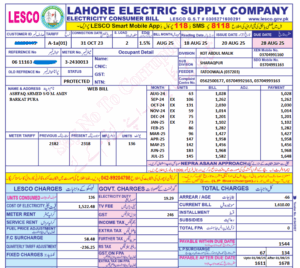
Your 10-Digit Consumer ID This is the unique identifier assigned to your connection. It’s typically printed at the top of your bill, on the envelope, and sometimes on your meter itself. Think of it like your LESCO membership number. This stays the same for your connection and never changes unless you request a new connection.
Your 14-Digit Reference Number This is printed on every bill and changes monthly. It’s basically a one-time reference for that specific billing period. You’ll see it prominently displayed on your bill—usually near the bill date or amount due. Since it changes every month, you’ll need the current month’s reference number to pull up your latest bill.
Pro tip: Take a photo of your most recent bill and save it to your phone. When you need to check your bill online later, you’ll have both numbers at your fingertips without having to search for the original document.
How to Check Your LESCO Bill Online: A Step-by-Step Walkthrough
This process is genuinely simple, but let me walk you through each step so there’s zero confusion.
Step 1: Access the Official LESCO Website
Open your web browser—Chrome, Safari, Firefox, whatever you use regularly—and navigate to one of these official platforms:
- www.lesco.gov.pk (the official government portal)
- www.lescobill.co (the dedicated bill checking platform)
Both are secure, official LESCO channels. The second option (lescobill.co) is specifically designed for bill checking, so it often loads faster and offers a cleaner interface.
Pro move: Bookmark the page. You’ll likely need to check your bill again next month, and having it bookmarked saves you from typing the URL every time.
Step 2: Locate the Bill Checking Section
When you arrive at the homepage, you’ll see several options. Look for a section labeled:
- “Check Bill”
- “Bill Details”
- “Customer Menu”
- “Online Bill Verification”
The exact wording varies slightly depending on which platform you’re using, but the concept is identical. Click on that section. It’s usually prominently displayed on the homepage.
Step 3: Enter Your Information
Now comes the crucial part. You’ll see a form with two main fields. You only need to fill in ONE of these:
Option A: Using Your 10-Digit Consumer ID
- Enter your Consumer ID
- This works even if you don’t have your current bill handy
- Useful if your bill is missing or damaged
Option B: Using Your 14-Digit Reference Number
- Enter your Reference Number from your current bill
- More specific to the current billing period
- Ideal if you have your bill in front of you
Which should you choose? Honestly, either works fine. If you’re looking for your current month’s bill, use the reference number since you likely have it nearby. If you’re retrieving older bills or don’t have your current bill, use your Consumer ID—it’s more universal.
Step 4: Submit and Wait
Click the “Submit” or “Check Bill” button. Your browser will process the request. This usually takes 5-10 seconds.
If something goes wrong—like you entered an incorrect reference number or your Consumer ID is invalid—you’ll get an error message immediately. Read it carefully. It usually tells you exactly what went wrong so you can correct it on the second attempt.
Step 5: View Your Duplicate Bill
Once verified, your LESCO bill appears on your screen. Everything’s there: consumption details, amount due, payment due date, previous balance, late fees (if applicable), and a breakdown of your charges.
From this point, you have two options: print it immediately or download it as a PDF for later use.
How to Print and Download Your LESCO Bill: The Technical Part Made Simple
Once your bill appears on screen, you’ve got two straightforward paths forward.
To Print Your Bill:
- Press Ctrl + P (Windows) or Cmd + P (Mac)
- Your printer settings dialog opens
- Select your printer
- Choose “Print”
- Your duplicate bill prints in under 30 seconds
That’s it. You now have an official, printed duplicate bill in your hands.
To Download as PDF:
- Press Ctrl + S (Windows) or Cmd + S (Mac)
- Choose “Save as PDF” from the dropdown menu
- Select where you want to save it (I recommend a folder labeled “Utility Bills” or “LESCO” on your computer)
- Give it a filename like “LESCO_Bill_July2026”
- Click Save
The PDF becomes a permanent digital copy on your device. You can email it, print it later, or share it with government offices or your bank.
Organization tip: Create a dedicated folder on your computer or cloud storage for utility bills. Name it clearly (like “Household Bills” or “LESCO 2026”). Download each month’s bill into this folder as soon as you pay it. This way, when you need proof of residence or historical consumption data, you’ve got everything organized and searchable.
Is a Duplicate Bill Legally Valid? Addressing Your Biggest Concern
Here’s where many people hesitate, and I completely understand why. You’re thinking: “Is this duplicate bill really as legitimate as the original? Will government offices accept it?”
The answer is an unqualified yes.
A duplicate bill carries the same legal weight as your original bill. LESCO explicitly confirms this on their official platforms. The duplicate bill contains:
- Your authentic consumer ID
- Verified consumption data
- Official bill amount
- LESCO’s digital signature or verification mark
- All necessary details for legal purposes
Where duplicate bills are accepted:
- Bank account opening and KYC verification
- Property registration and transfer
- Visa applications (proof of residence)
- Government office documentation
- Utility complaints and disputes
- Insurance claims
- School or university enrollment
- Address proof for any official purpose
Think of it this way: LESCO’s database is the source of truth. Whether you have the physical paper or a duplicate printed from their online system, the information is identical and comes from the same verified source. The government and financial institutions recognize this.
The only scenario where you might face resistance is if you’re dealing with an extremely old-fashioned institution that insists on original paper bills. In practice, this is rare. When it happens, you can usually print the online bill on official letterhead paper, and that solves the problem.
Troubleshooting Common Issues: What to Do When It Doesn’t Work
Sometimes things don’t go smoothly on the first try. Here are the most common hiccups and how to fix them.
“Error: Invalid Reference Number”
- Double-check you’re entering the 14-digit number exactly as printed
- Don’t include spaces or dashes—just the numbers
- Ensure you’re using the current month’s reference number, not an old bill’s reference number
“Consumer ID Not Found”
- Verify you’re entering all 10 digits correctly
- Make sure you have an active LESCO connection (sometimes there’s a delay if you recently transferred a connection)
- Try using the reference number instead
“No Bill Available for This Period”
- Check the date—maybe your bill hasn’t been issued yet
- Ensure you haven’t confused your billing cycle dates
- Contact LESCO customer service if you haven’t received a bill in over a month
“Website Won’t Load”
- Try a different browser (Chrome, Firefox, Edge)
- Clear your browser cache (Ctrl+Shift+Delete on Windows, Cmd+Shift+Delete on Mac)
- Check your internet connection
- Try again in a few minutes (occasionally the server experiences brief downtime)
“I Forgot My Consumer ID”
- Check your old bills—it’s printed on all of them
- Call LESCO customer service: they can verify your information and provide your Consumer ID
- If you have recent billing statements from any correspondence, it’s listed there too
Pro Tips for Managing Your LESCO Bills Like a Savvy Consumer
Now that you know how to access your bills, let me share some insider strategies that’ll make your life even easier.
1. Set a Monthly Reminder Put a note in your calendar for your bill due date. Check the bill online three days before payment is due. This gives you time to arrange payment without rushing and risking late fees.
2. Track Your Consumption Patterns Look at your monthly units consumed. If summer usage is significantly higher (air conditioning), you can budget accordingly. If you notice a sudden spike, investigate—it might indicate a fault with your meter or an appliance malfunction.
3. Download and Archive Immediately When you check your bill, download it to your computer that same day. Don’t wait until you “might need it.” Future-you will be grateful when you need proof of address three months from now.
4. Verify Amount Before Payment Before you transfer money, visually confirm the amount due. Rare billing errors happen. Catching them before payment saves you potential disputes and headaches.
5. Keep Your Consumer ID Safe While the Consumer ID is semi-public (it’s on bills), treat it like sensitive information. Don’t share it casually on social media or in group chats.
6. Use Email Billing Notifications Many LESCO platforms now offer email notifications when your bill is ready. Enable this if available. You’ll never miss a payment deadline again.
7. Check Multiple Months Curious about your consumption trends? Pull up bills from the last 3-6 months and compare them. You’ll spot patterns and understand your actual average usage, which helps with budgeting.
Common Mistakes to Avoid
Let me save you from some frustrating experiences others have had.
Mistake #1: Entering the Wrong Reference Number Using last month’s reference number when you need this month’s bill. Result: the system can’t find current bill data. Fix: Always use the reference number from the month you’re trying to access.
Mistake #2: Including Spaces or Dashes Typing “123-456-789-012” instead of “12345678912” causes the system to reject your entry. Enter numbers only, no formatting.
Mistake #3: Not Saving Your Password Securely If you set up an online account, use a strong, unique password. Don’t use your birth date or something obvious. If you use a password manager (like LastPass or 1Password), store it there for safety.
Mistake #4: Checking the Wrong Website Scammers occasionally create fake LESCO billing sites. Always use the official URLs: lesco.gov.pk or lescobill.co. Bookmark the real site and use your bookmark instead of searching for the URL.
Mistake #5: Assuming Your Bill Is Wrong Without Verification Sometimes the amount seems higher than expected. Before complaining, check:
- Are you looking at total due or just this month’s consumption?
- Did you have an outstanding previous balance?
- Are there disconnection/reconnection charges?
- Did you forget about a seasonal surge?
Usually there’s a logical explanation.
FAQ Section: Answers to Your Pressing Questions
Q1: How often can I check my LESCO bill online?
A: As many times as you want. There’s no limit. Check daily if you’re that curious about consumption trends, or once a month when your bill is due. The system doesn’t penalize frequent checks.
Q2: Can I get bills from previous years?
A: Most platforms allow you to access bills from the last 12-24 months. Extremely old bills (3+ years) may not be available in the online system. Contact LESCO’s customer service for archived bills beyond that timeframe.
Q3: What if my name is spelled differently on my bill?
A: This is surprisingly common, especially with Urdu-to-English transliterations. It won’t prevent you from checking your bill online, as long as your Consumer ID or Reference Number is correct. If you want your name corrected officially, visit a LESCO office or contact customer service.
Q4: Is there a charge for getting a duplicate bill online?
A: No. Checking your bill and downloading duplicates online is completely free. This is one of LESCO’s free services for registered consumers.
Q5: Can I set up bill notifications?
A: Yes. Many platforms offer email or SMS notifications when your bill is ready or when you’re approaching the due date. Check the account settings or preferences section on the bill checking platform.
Q6: What if I moved but haven’t updated my address with LESCO?
A: You can still check your bill online using your Consumer ID or Reference Number—the address on your account doesn’t affect online access. However, you should update your address with LESCO separately for official purposes.
Q7: Is my personal information safe when I enter it on the LESCO website?
A: LESCO’s official platforms use SSL encryption (you’ll see “https://” in the URL), which protects your data during transmission. However, only enter information on official LESCO websites. Never trust a website that pops up as an ad or seems suspicious.
Q8: Can I pay my bill directly from the bill checking website?
A: Some platforms allow direct payment through the site using bank transfers or online banking. Others just show the bill, and you pay separately through your bank or LESCO’s payment portal. Check if the option is available on your platform.
Q9: What happens if my bill shows a zero balance?
A: This usually means you’ve paid in full and have no outstanding balance. Occasionally, you might even have a credit balance (if you’ve overpaid). You’ll see this clearly on your bill.
Q10: Can someone else check my bill if they have my Consumer ID?
A: Technically yes—the system doesn’t require a password for basic bill checking. This is why the Consumer ID isn’t considered highly sensitive information. However, if you want privacy, don’t share your Consumer ID with others, and be cautious about displaying bills that show it.
6. KEY TAKEAWAYS
✓ LESCO bills are instantly accessible online using your 14-digit reference number or 10-digit consumer ID
✓ Duplicate bills are legally valid for government applications, bank accounts, visa processes, and any official purpose
✓ The entire process takes under one minute—from opening the website to downloading your PDF
✓ You have two official platforms: lesco.gov.pk (government) and lescobill.co (dedicated bill checking)
✓ Always verify your bill information before payment and catch errors early
✓ Download and archive bills systematically for future reference and proof of address
✓ Neither the website nor duplicate bills require payment—this is a free LESCO service
✓ Common errors are easily fixable: wrong reference numbers, formatting mistakes, or outdated information.